Send your newest tech out alone.
Have them work the call your best tech would.
ACLogics turns what the homeowner said into an ordered list of checks — each with the reading that confirms a cause and the reading that eliminates it. Generate the diagnosis online, then follow it, log findings and close the call offline in a crawlspace with no bars.



Free to start — 50,000 tokens that never expire, no credit card.
These are real. Word for word.
Every question below was typed into ACLogics by a working technician. The first check is what the app told them to do — before anything got replaced.
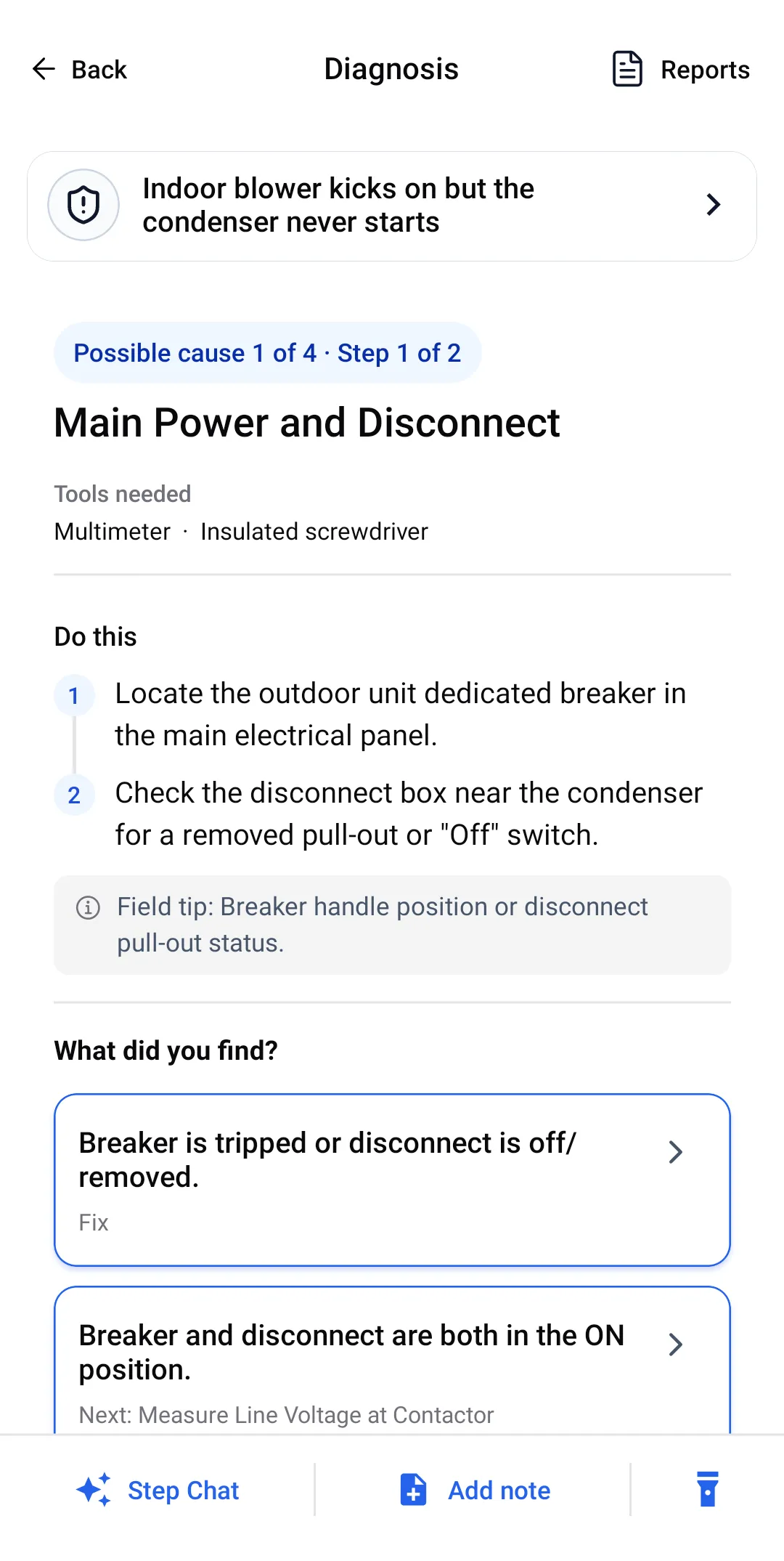
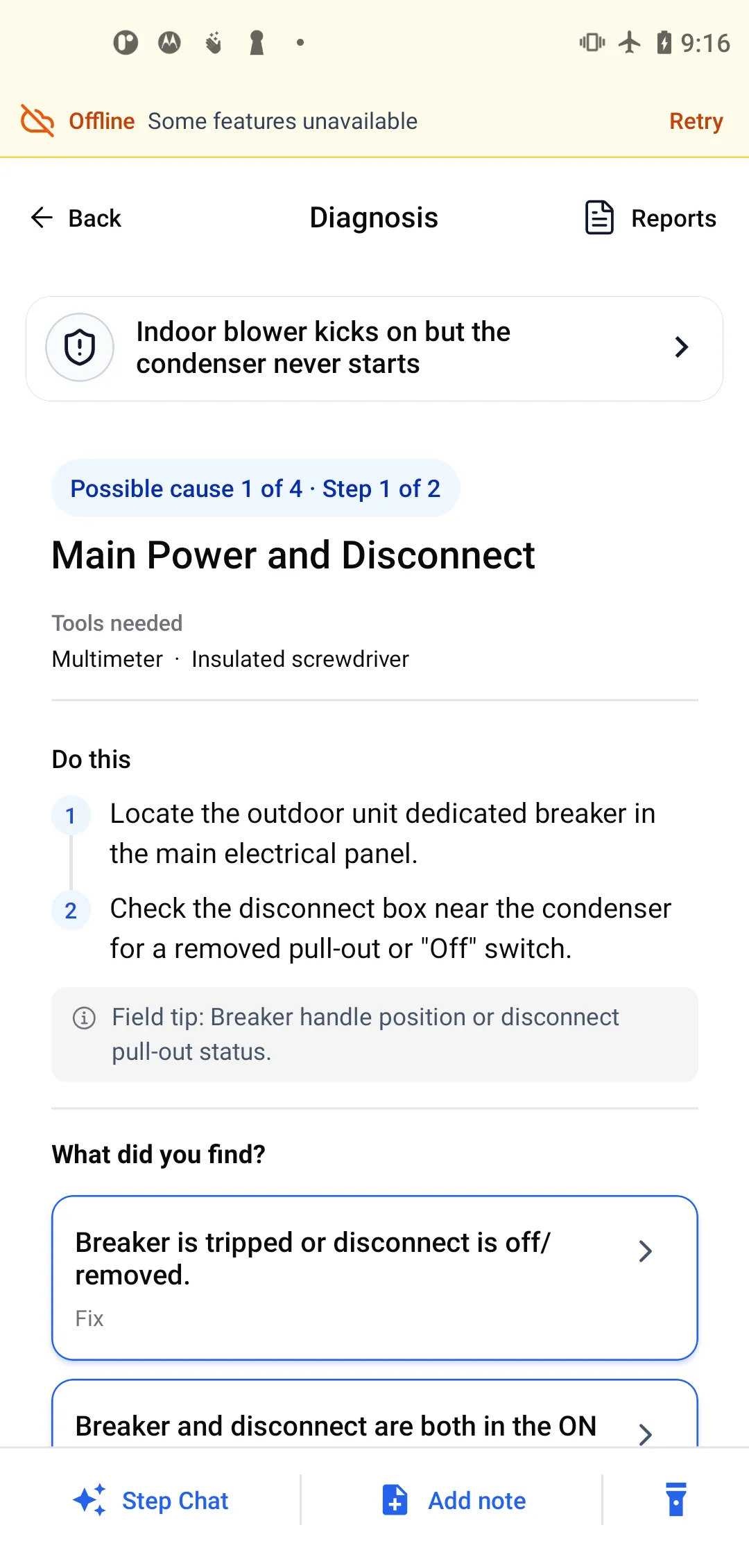
First check: Is the outdoor breaker tripped or the disconnect pulled? If both are on, measure line voltage at the contactor before touching anything else.
AC not cooling → “Not cooling freezing up on the feeder tubes on the evaporator coil”First check: Pull the return filter and hold it to the light. If you can see through it, airflow is not the problem and the refrigerant side is next.
AC not cooling → “Blower motor keeps turning on and off and condenser is off”First check: Kill power and feel the motor housing. Above 140°F it is cycling on its own thermal overload, and that changes every check after it.
Short cycling → “TRANE A/C from 2020. System starts but suction pressure drops very quickly to around 55 psi. And high side pressure stays around 270 with an OD ambient temp of 76.”First check: Filter and coil first, then confirm the blower is actually moving air — before anyone reaches for the gauges.
How the guided workflow works →Questions quoted verbatim from real diagnostic sessions.
Guessing is expensive, and it is the newest tech who pays for it
Nobody sets out to part-swap. It happens because a check got skipped, or a component got cleared by eye instead of by meter, and there was nobody in the attic to catch it.
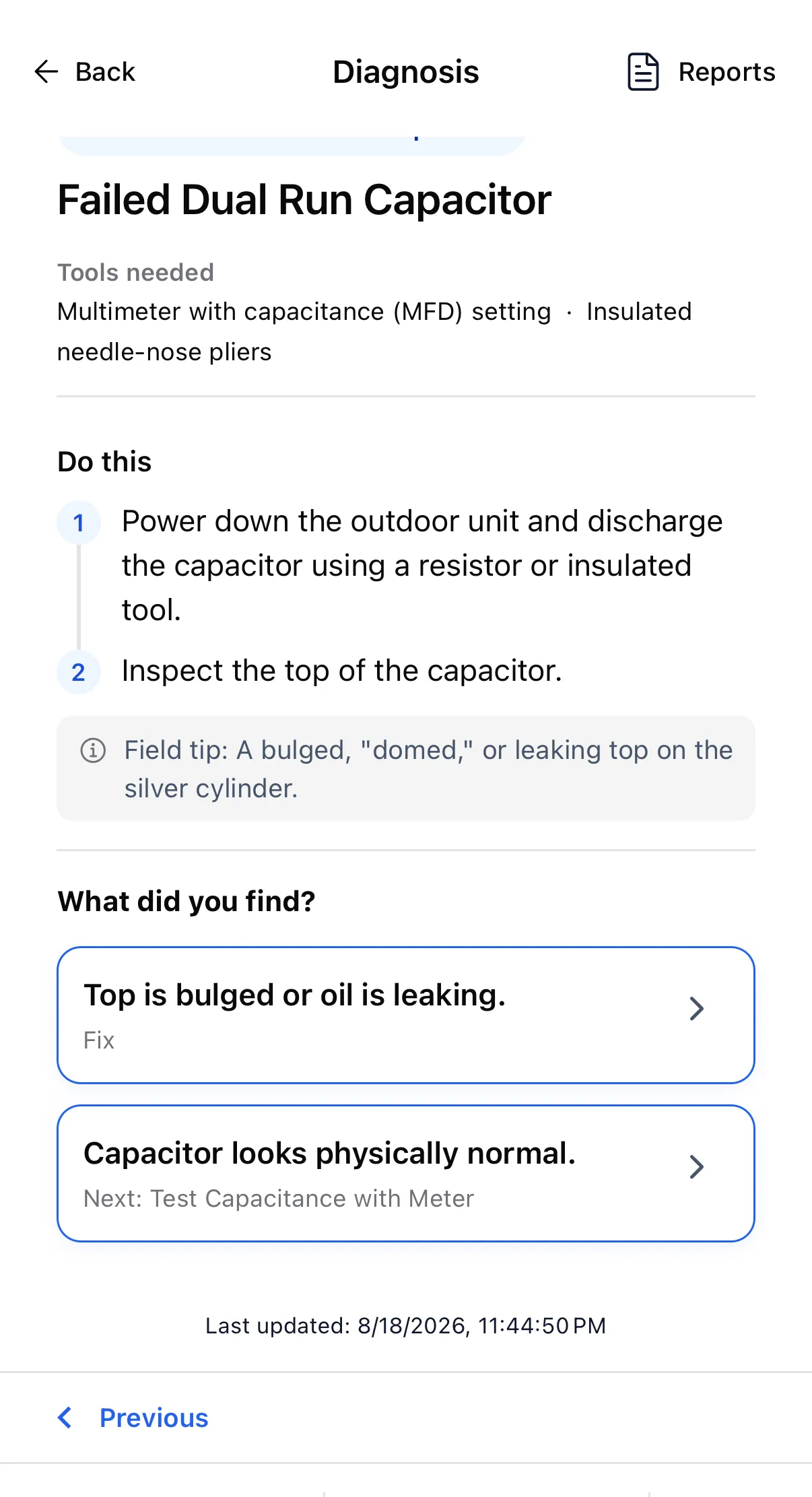
- The part that looked fine. A run capacitor with a flat, clean top passes a visual inspection and still tests outside its rated MFD. Eyes clear it; only the meter fails it.
- The callback. The first visit fixed something real and missed the cause. You pay for the second truck roll, and the homeowner remembers it.
- The explanation nobody can give. A tech who cannot say why a part needs replacing gets a "let me think about it" — and the job goes to whoever explains it better.
One real call, start to finish
This is a single diagnosis from the app, walked in the order the technician walked it — not a mock-up. It ended with the system verified as repaired.
“Fan inside kicks on condenser not kicking on”
The indoor blower runs. The outdoor unit is silent. There are at least four reasons that happens, and three of them are cheaper to check than the fourth.
Start with power, because it is free to check
Cause 1 of 4 is the breaker and the disconnect, with the tools listed up front and the actions in order. Both were on, so the next check is line voltage at the contactor.
Eliminate it out loud
208–240V at the contactor line side. The app does not just move on — it records the verdict and the reason, so the cause is closed rather than forgotten.
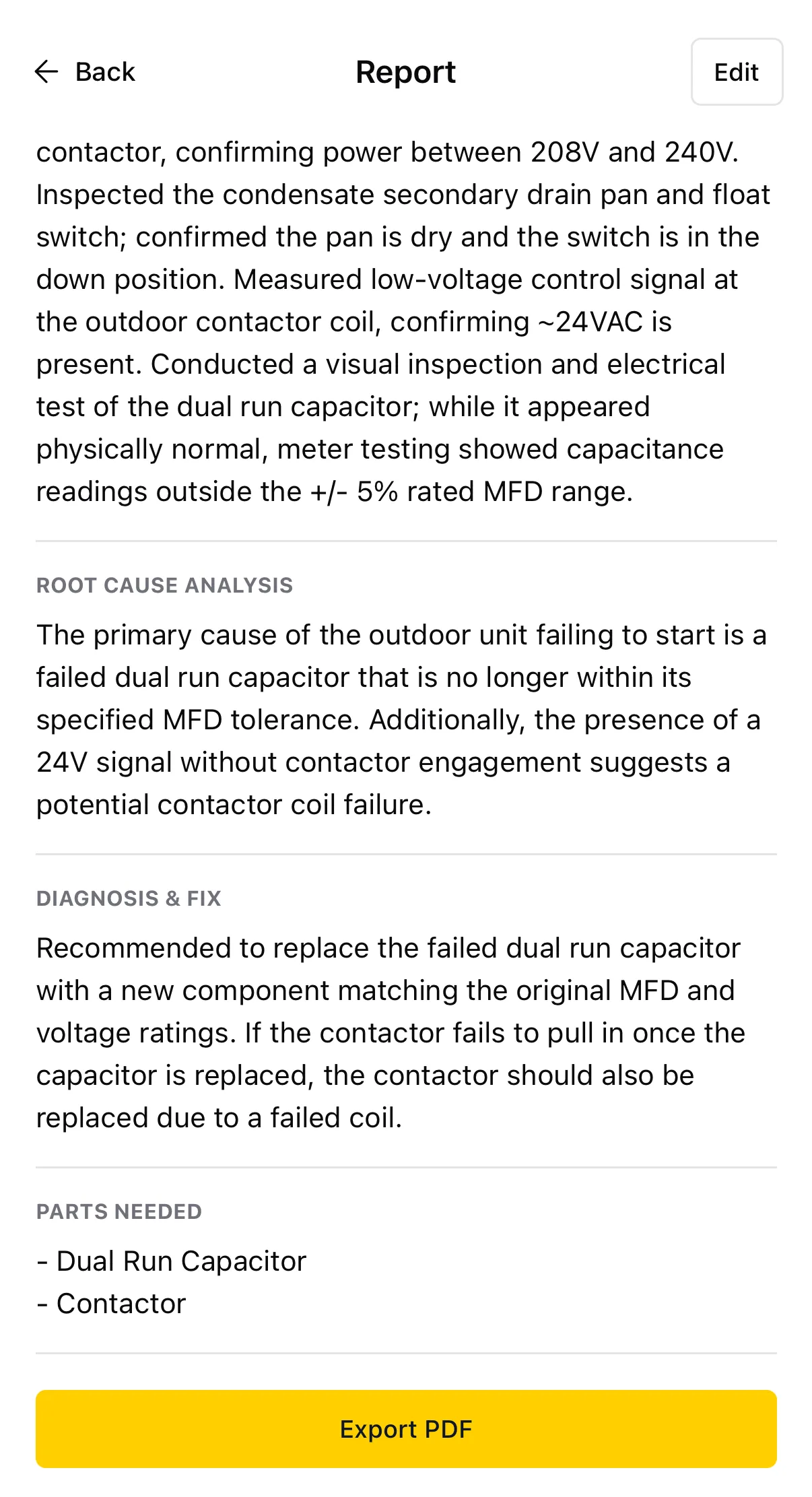
- Ruled out Main power and disconnect — the outdoor unit has high-voltage power.
- Ruled out Condensate float switch — pan dry, float in the down position.
- Signal present ~24VAC at the contactor coil, so the thermostat call is arriving.
The step a newer tech would have skipped
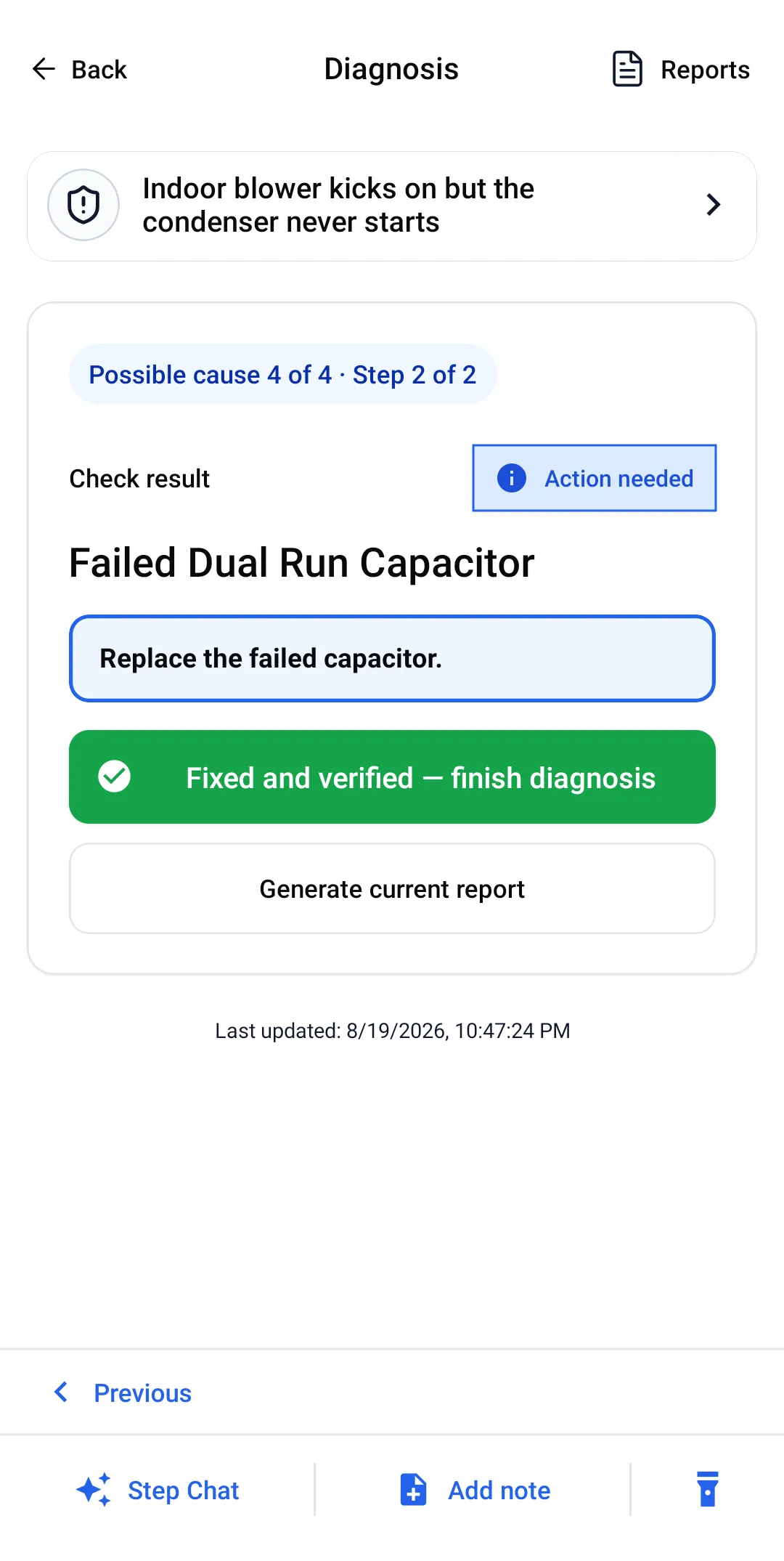
Cause 4 is the dual run capacitor. It was not bulged, not leaking, not weeping oil — it looked perfect. The app did not accept that as an answer: choosing "capacitor looks physically normal" leads to Test Capacitance with Meter, not to a conclusion.
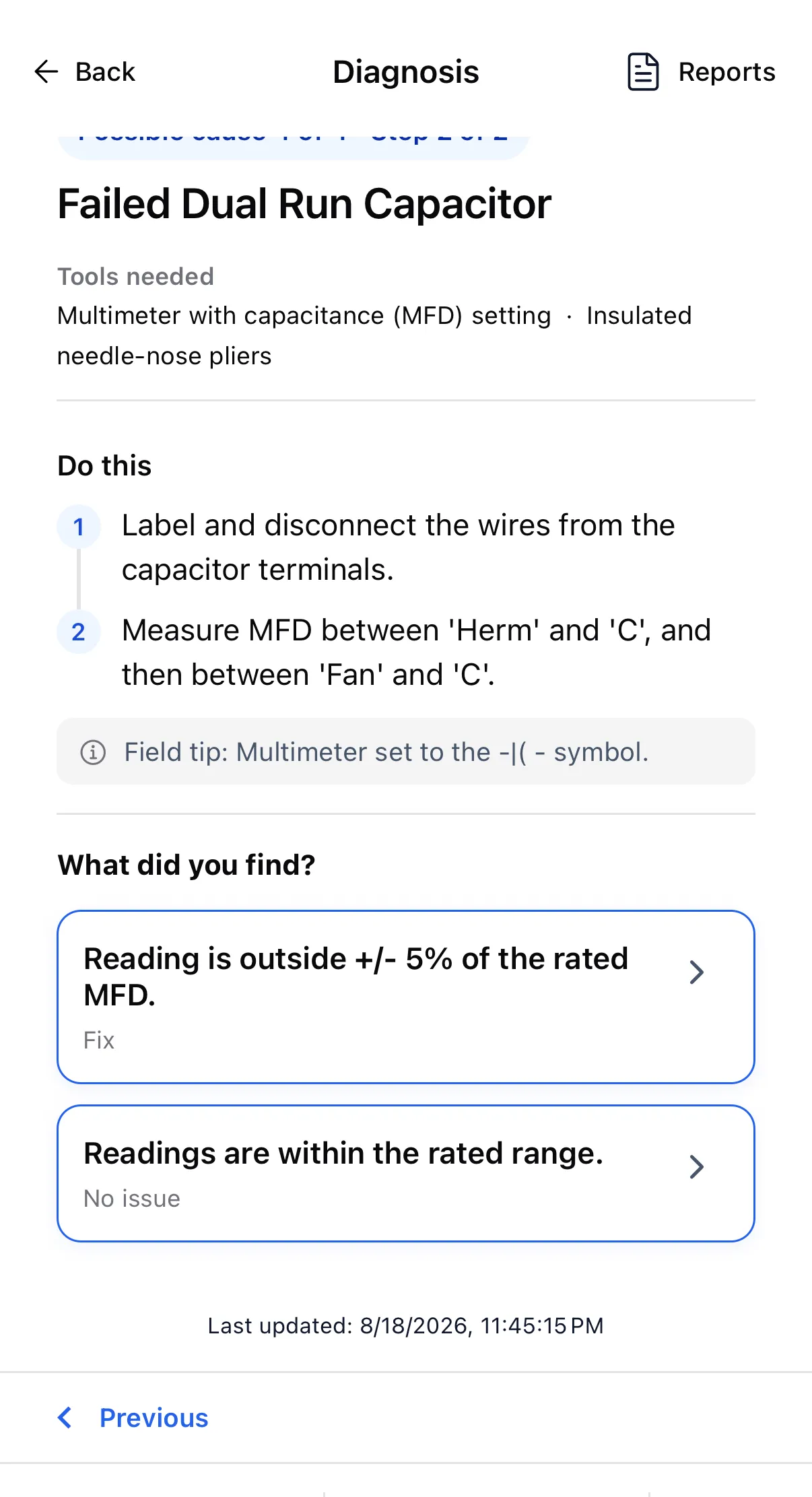
Metered between Herm and C, then Fan and C: outside ±5% of rated MFD.
- Found it Replace the failed capacitor.
Leave with something the homeowner can approve
The report is written out of the checks that were performed — including the ones that found nothing, which is what makes it persuasive. Parts needed came out as dual run capacitor and contactor, and it exports to PDF from the phone.
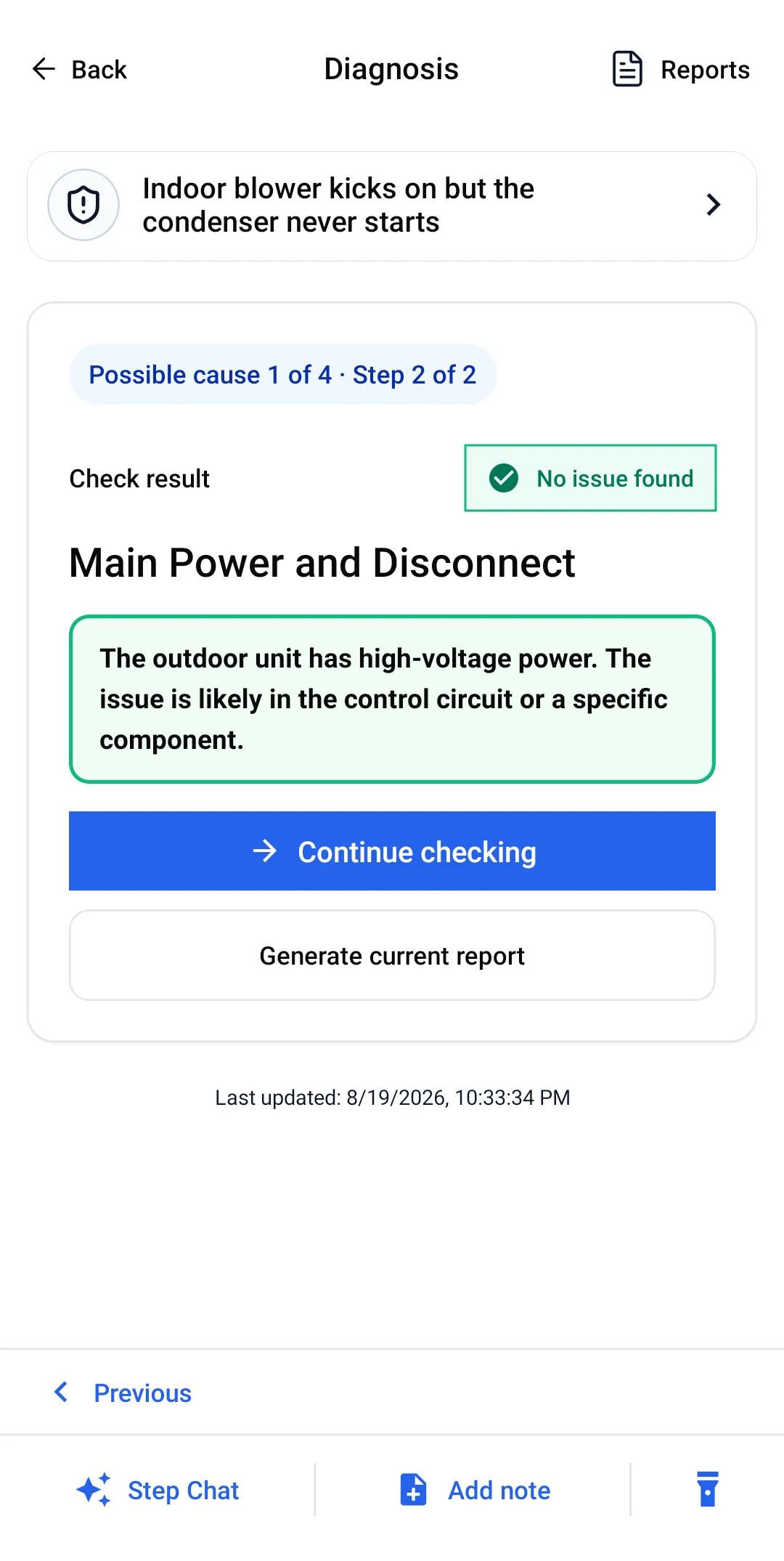
Across 310 diagnoses generated in the app, 295 contained at least one check whose only job was to eliminate a cause.
The check nobody on your crew would have thought to run
A second real diagnosis. This one matters less for what it fixed than for what it refused to let happen.
“I am a new technician at a job site in Mobile, Alabama… My boss gave me a brand new 14 SEER split-system AC unit that was sitting in the warehouse to replace a dead 2.5-ton system. I just finished the installation… the Superheat is 25°F (too high) and the Subcooling is only 2°F (too low).”
A fair, careful question about charge — from someone doing their best on a job they were sent to alone.
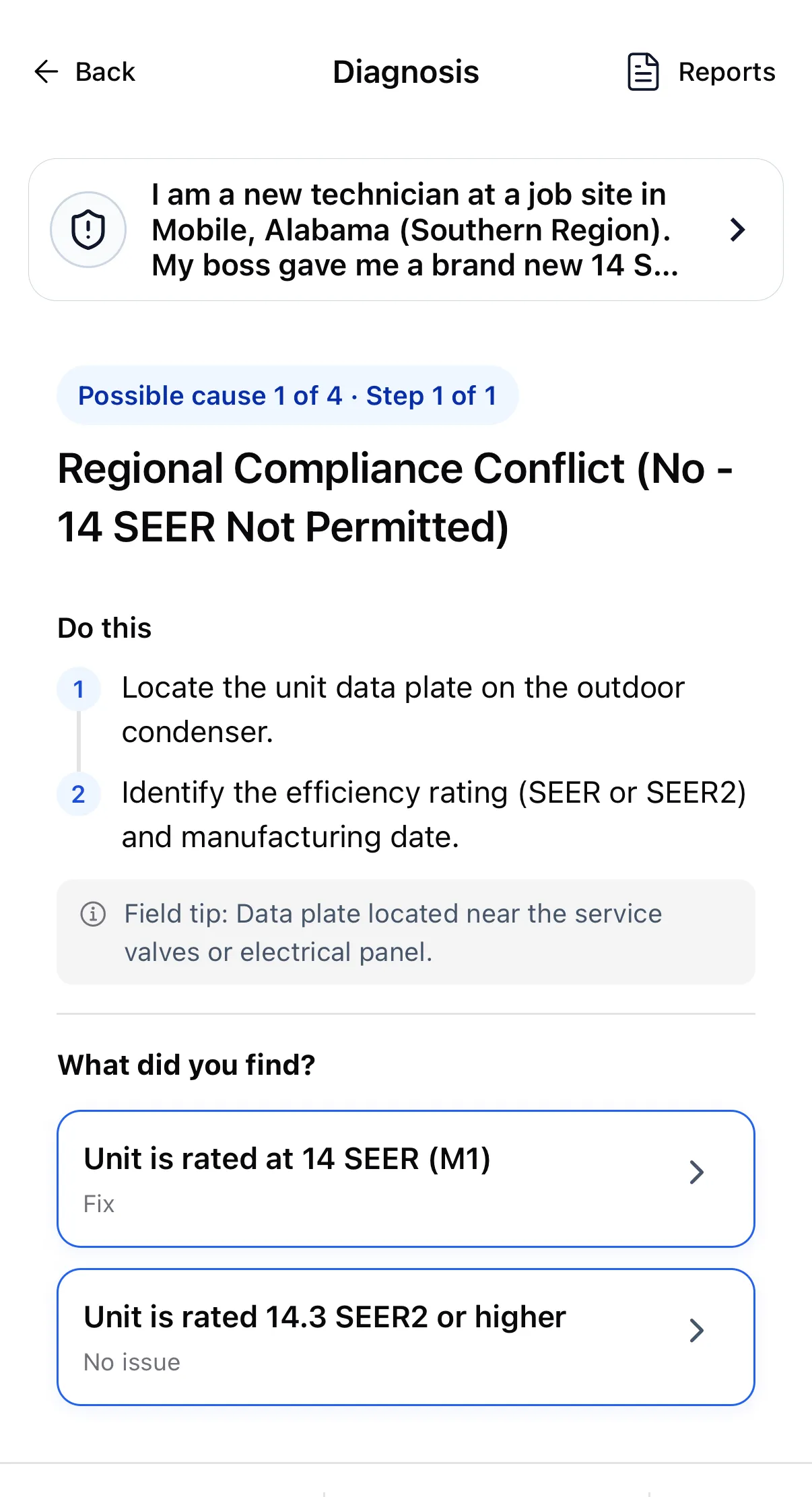
Ranked above every refrigerant check, as possible cause 1 of 4: verify the unit's SEER/SEER2 rating against the region. In the DOE South region a new split-system install requires a minimum of 14.3 SEER2. Old 14 SEER warehouse stock does not qualify.
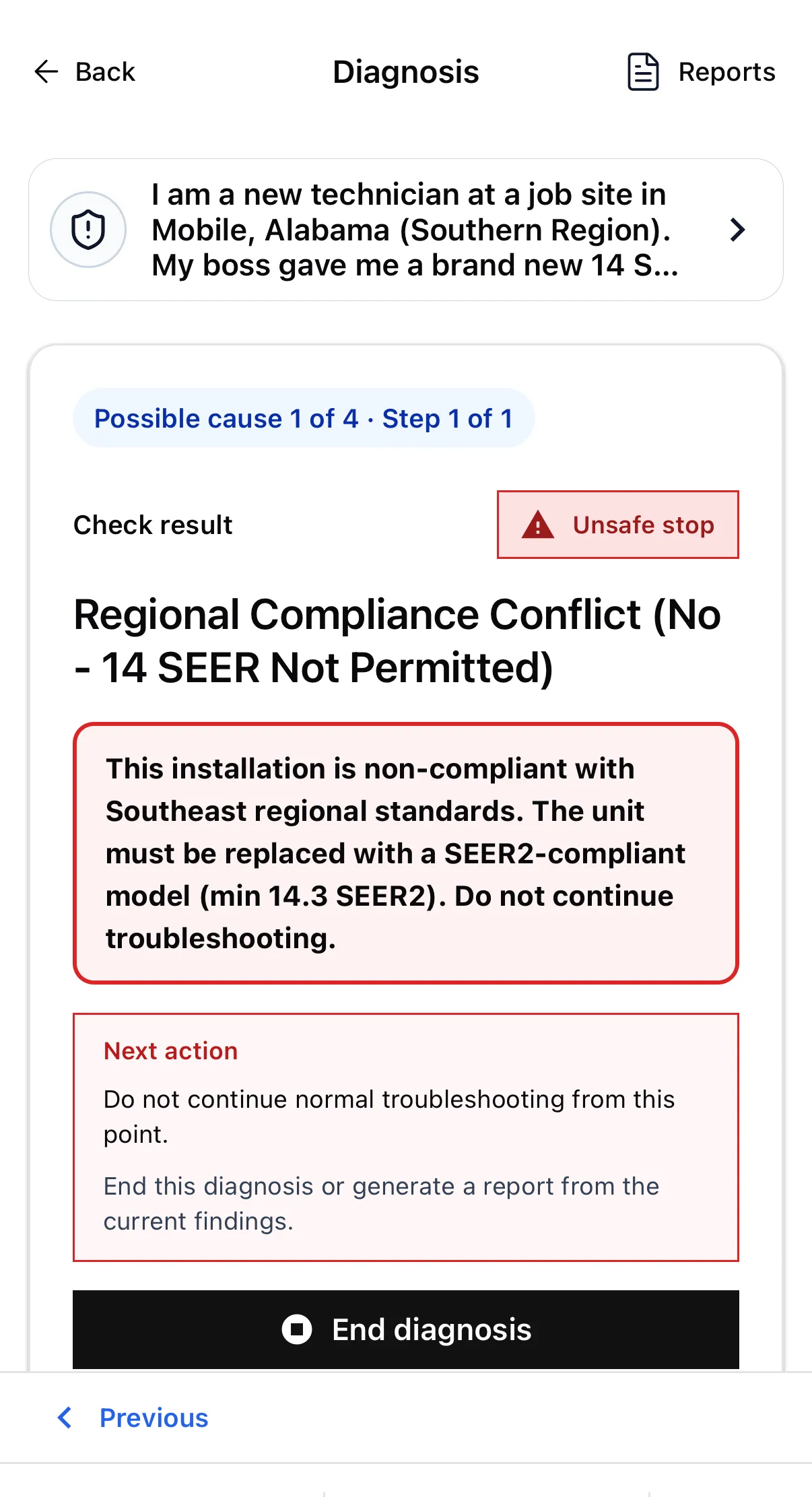
Confirming the rating did not produce a repair step. It produced a stop — do not continue troubleshooting — and the option to end the diagnosis or write up what had been found so far.
- Unsafe stop The installation is non-compliant; the unit must be replaced.
Your newest technician was never going to look up regional efficiency rules while standing in front of a condenser they had just installed. Whoever handed them the unit was not going to be on site either.
The rest of the call, not just the diagnosis
Identical on every plan, residential or commercial.
Nameplate scanner
Photograph the data plate on the outdoor unit and the brand, model and serial land in the job record. No squinting at a faded label with a flashlight in your teeth.
See how it works →Offline field execution
The diagnosis is generated online. Reading it, following it, recording what you found and finishing the call all work with no signal — crawlspaces, basements, attics.
See how it works →Customer-ready PDF report
Findings, root cause, the fix and the parts list, exported as a PDF from the phone before you leave the driveway. Available on the free plan.
See how it works →Searchable job history
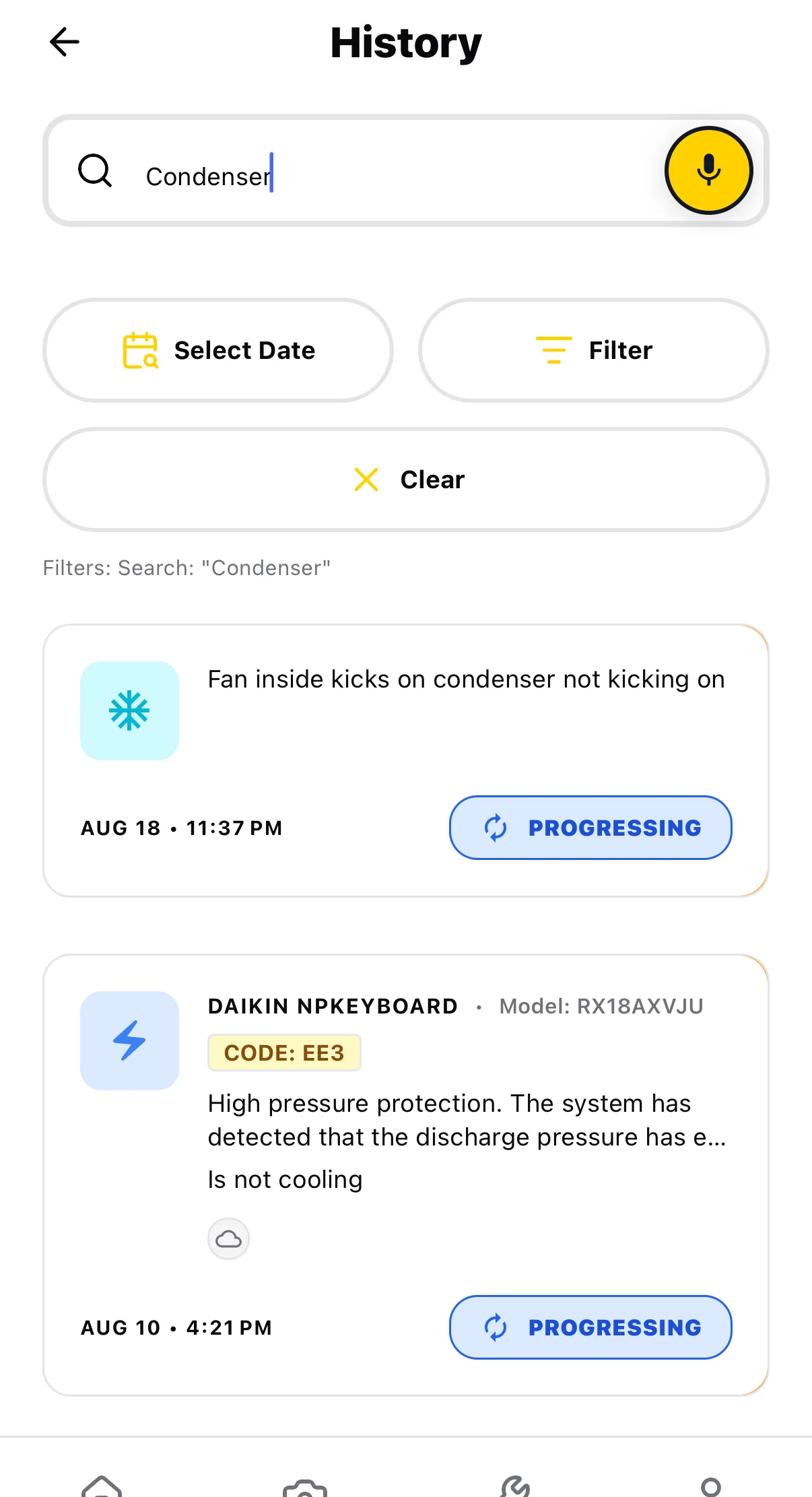
Search past calls by symptom, brand or model. When the same house calls back in August, you can see exactly what was checked in June.
See how it works →What “offline” actually means here
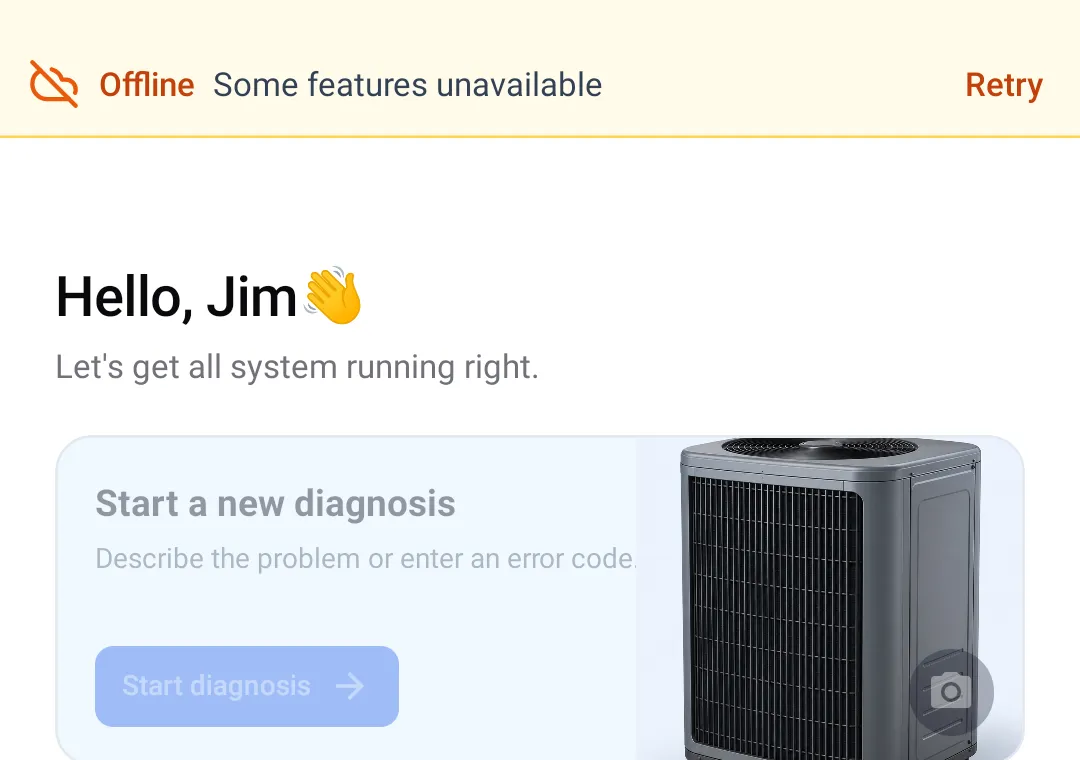
Plenty of tools say offline and mean “it will not crash”. Here is the real split, photographed on a phone in airplane mode.
- Saved work offline: read jobs stored on this phone, follow their steps, record checks, add notes, and edit or export an existing stored report.
- Needs internet: new AI diagnoses, Side Chat, AI report generation, and Scan Pro. Open the jobs and reports you need while online before leaving service.
Which is why the habit that works is: create the diagnosis in the truck, walk the checks in the crawlspace. Anything you change offline uploads itself when you come back up.
Will it know the system in front of me?
ACLogics does not work from a stored fault-code table for each model. You describe the symptom and it reasons out a check order from how the system is actually behaving — so an equipment list is not the boundary of what it can help with.
- Air conditioners
- Gas & oil furnaces
- Heat pumps
- Ductless mini-splits
- Variable-speed / inverter
- Packaged units
- Hydronic boilers
Where it stops
It cannot take a reading for you and it does not know what the last tech did to this system. On anything unusual it will tell you to escalate rather than invent a next step. You still need a technician on site who can hold a meter.
Compatibility
10 supported brands in current workflows
These logos show equipment brands referenced in ACLogics workflows. They are compatibility proof, not customer logos or endorsements.










The questions you would ask before putting this in front of your crew
What if the AI gets it wrong?
It will, sometimes. It cannot read your meter, smell a burnt winding, or hear a compressor struggling. Treat a reading that contradicts the screen as the truth and the screen as the thing that is wrong.
What it is reliably good at is making sure nothing gets skipped — which is exactly where a newer tech gets into trouble. And when a route is wrong, you pick the answer that says so and the app marks that cause eliminated, with the reason, and moves to the next one.
Do I need a signal on site?
To generate a new diagnosis, yes. After that, no. The steps, the branches and your recorded findings all work offline, and sync when you come back up.
Where does the job data live?
On the phone, in a local database, so history and reports stay readable with no connection. It syncs to your account when you are back online.
Will my senior techs actually use it?
Honestly, they will use it less than your junior techs — a 20-year tech does not need to be told to check the disconnect. Where it earns its keep with them is documentation: the report writes itself out of the checks that were already performed.
Does this replace training?
No. It gives a newer tech a correct order of operations on a call you are not standing next to, and it gives you a record of what they actually checked. That is a supplement to training, not a substitute for it.
What does it cost to find out?
The free plan includes a one-time grant of 50,000 tokens that never expire — enough for two to three complete calls, start to finish, including the report. No credit card.
Try it on one call before you decide anything
One tech, starting free
A one-time grant of 50,000 tokens that never expire — two to three complete calls, including the report.
- Symptom intake and guided diagnosis
- Customer-ready PDF reports
- 30-day job history
- No credit card
A crew, on one bill
The app is the same for a team — the difference is that seats, roles and payment are managed in one place instead of reimbursing individual App Store receipts.
- Invite technicians and assign roles
- One invoice instead of many
- 7-day free trial, no credit card
Your next junior tech's first solo call
Give them the check order your best tech would have used.
Free to start · No credit card · Tokens never expire